Screenshots


App details
- Version
- 1.2
- Updated
- May 23, 2023
- Requires
- Mac
- Language
- English
- License
- Free
- Developer
- Spicy-Apps
- Category
- Mac OS
SoftPas in:
This product is also available in the following languages:
About Fast Address Book
Download Fast Address Book – Free Windows, Mac, Android & iOS Shortcut Tool
Overview – What Is Fast Address Book?
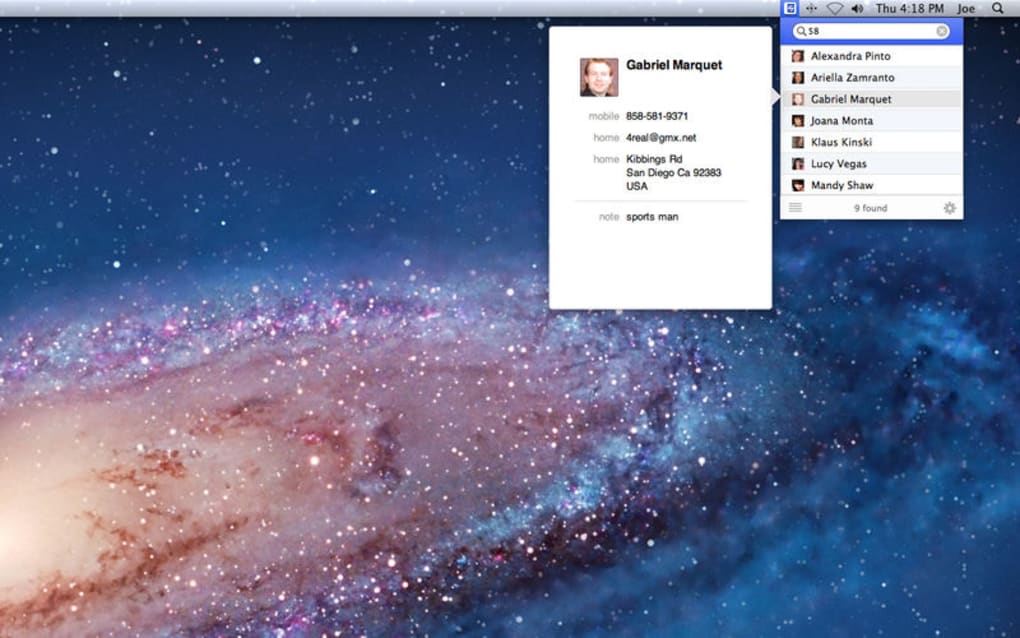
Fast Address Book is a lightweight, free utility designed to give you instant access to the contacts stored in your existing address book. By placing a small icon in the status bar or top‑right corner of your home screen, the app lets you pull up a condensed version of your pre‑installed address book with a single click or hot‑key press. The idea is simple yet powerful: eliminate the seconds you normally spend opening a full‑featured contacts application, navigating through menus, and waiting for it to load. Instead, a drop‑down menu appears instantly, offering a searchable list of your contacts, complete with thumbnail photos where available.
While Fast Address Book is not a replacement for a full‑featured contact manager, it shines as a convenience layer for power users who frequently look up phone numbers, email addresses, or physical locations. The tool works across major platforms – Windows, macOS, Android, and iOS – and integrates seamlessly with the native address book each operating system provides. Because it relies on the contacts already stored on your device, there is no need to import or sync additional data, which keeps the application secure and privacy‑friendly.
Key Features
- Instant status‑bar icon for one‑click address book access.
- Drop‑down contact list that appears within seconds.
- Live search that filters contacts by first or last name.
- Support for thumbnail photos next to contact names.
- Customizable hot‑key for keyboard‑oriented users.
- Free of charge – no hidden fees or subscription required.
- Cross‑platform compatibility (Windows, macOS, Android, iOS).
- Lightweight footprint – uses minimal system resources.
- Secure access – reads contacts directly from the OS without storing them externally.
- Automatic updates to stay compatible with the latest OS releases.
Installation, Setup & Compatibility
Installing Fast Address Book is straightforward on all supported platforms. On Windows and macOS, download the installer from the official website, run the .exe or .dmg file, and follow the on‑screen prompts. The installer will request permission to read your contacts, a standard requirement for any app that accesses address book data. Once granted, the program automatically adds its icon to the system tray (Windows) or menu bar (macOS). For Android users, the app is available through the Google Play Store; simply tap “Install,” accept the contact permission, and the shortcut appears in the notification shade. iOS users can download Fast Address Book from the App Store; after installation, the app adds a widget that can be placed on the home screen or in the Today View.
After installation, launch the application and you’ll be greeted by a brief configuration wizard. The wizard lets you choose the default hot‑key (e.g., Ctrl + Alt + C on Windows) and decide whether the drop‑down should show only favorite contacts or the entire address book. You can also enable or disable the thumbnail preview depending on your performance preferences. The settings are saved locally, and the app respects the native dark‑mode theme of each OS.
Supported operating systems: Windows 10/11, macOS 10.15 and later, Android 8.0 and later, iOS 13 and later. The app is regularly updated to maintain compatibility with new OS releases and security patches.
Because Fast Address Book reads directly from the system’s native contacts database, there is no separate data file to back up. If you ever need to reinstall, simply download the latest version and the app will automatically re‑populate the drop‑down with your existing contacts. This design also means that any changes you make to contacts in the native address book (additions, deletions, or edits) are instantly reflected in Fast Address Book without the need for manual refresh.
Pros and Cons – Strengths and Weaknesses
Pros
- Blazingly fast access – the drop‑down appears in less than a second.
- Free and ad‑free, making it an attractive alternative to paid shortcuts.
- Cross‑platform support ensures a consistent experience on desktop and mobile.
- Lightweight design does not hog CPU or memory.
- Secure by design – no external storage of contacts.
- Custom hot‑key improves workflow for power users.
- Automatic updates keep the app compatible with new OS versions.
Cons
- Search algorithm is basic; it returns any contact containing the query string, leading to overly broad results (e.g., “Sara” also shows “Sarah”, “Sarat”).
- Contact photos sometimes appear without the associated address details.
- The first ten results load instantly, but additional matches experience a noticeable delay.
- Lacks advanced filtering options such as grouping by company or recent calls.
- No built‑in contact editing; you must open the native app to modify entries.
Overall, Fast Address Book delivers on its promise of speed and convenience, especially for users who need quick lookup capabilities. The drawbacks are mainly related to its status as a free tool – the search precision and loading consistency could benefit from a paid tier or future updates. Nevertheless, for most everyday scenarios, the pros outweigh the cons, making it a valuable addition to any productivity toolkit.
Frequently Asked Questions & Final Thoughts
Is Fast Address Book completely free?
Yes, Fast Address Book is offered at no cost. There are no hidden fees, in‑app purchases, or subscription models. The developer funds the project through optional donations.Does the app store my contacts on external servers?
No. Fast Address Book reads contacts directly from the operating system’s native address book and never uploads them to external servers. Your data stays on your device, ensuring privacy and security.Can I customize the hot‑key on Windows and macOS?
Absolutely. After the first launch, go to Settings → Hot‑Key and choose any combination of Ctrl/Alt/Shift with a letter or function key. The change takes effect immediately.Why does the search sometimes return unrelated contacts?
The current search algorithm performs a simple substring match across both first and last names. This can lead to broader results, such as “Sara” matching “Sarah” or “Sarat.” Future updates aim to introduce fuzzy matching and exact‑phrase options.Is there a way to limit the drop‑down to favorite contacts only?
Yes. In the Settings panel you can toggle “Show Favorites Only.” When enabled, the drop‑down will display contacts marked as favorites in your native address book, reducing clutter and improving load speed.Fast Address Book delivers a fast, secure, and completely free shortcut to the contacts you use most. If you find yourself opening your address book several times a day and want to shave off those extra seconds, this tool is worth a try. Download it today, configure your preferred hot‑key, and enjoy instant contact lookup on Windows, macOS, Android, or iOS. Take control of your productivity – get Fast Address Book now!
Guides & Tutorials
How to install Fast Address Book
- Click the Download button above.
- Once redirected, accept the terms and click Install.
- Wait for the Fast Address Book download to finish on your device.
How to use Fast Address Book
This software is primarily used for its core features described above. Open the app after installation to explore its capabilities.
User Reviews
No reviews yet. Be the first to share your experience.
You may also like
more
DiffusionBee
Generate unique art with this app DiffusionBee is a free and accessible artifici...

Excire Foto Light
Organize your snapshots Excire Foto Light is a free-to-download AI -powered phot...

Topaz Photo AI
Photo enhancement tool with AI Topaz Photo AI is a premium AI image editor for P...

anonymoX
Surf anonymously with Firefox anonymoX for Firefox is an add-on that gives you f...

DownThemAll
Download Them All! Downloading anything or everything on a webpage can be a labo...
.webp)
DuckDuckGo Privacy Essentials
A free program for Mac, by DuckDuckGo, Inc.. DuckDuckGo Privacy Essentials is a...